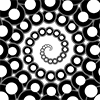
Notes:
There's a silver lining behind these clouds!
So many novice designs featured 'clouds' so we decided to 'seed' the JSGS with TNTCloud!
This shape features a 'baseCloud' ellipse. The 'numEllipses' parameter specifies the number of ellipses that are generated within or about the baseCloud that gives the puffy appearance. The attributes of each puffy ellipse come from the baseCloud 'parent.'
'ampX' and 'ampY' determine the ranges of the puffy ellipse centers and 'maxScaleFactor' scales the puffy ellipses from the geometry of the baseCloud.
Study the examples to get an idea of how it all works.
TNTCloud Features and Usage:
| Primary Attributes: |
5 Parameters:
|
|---|---|
| To Create: |
The examples above were created by:
var center = new TNTPoint(-5, 7);
//easier way to set the stroke thickness
lightGrayStroke.lineWidth = .1;
var leftCloudBase = new TNTEllipse(center, 6,
    3, white, lightGrayStroke, 200, 0);
var leftCloud = new TNTCloud(leftCloudBase, 15, .5, .5, 1);
leftCloud.drawTNTCloud(context);

center = new TNTPoint(5, 5);
offWhiteStroke.lineWidth = .5;
var rightCloudBase = new TNTEllipse(center, 7,
    4, lightBlue, offWhiteStroke, 200, 0);
var rightCloud = new TNTCloud(rightCloudBase, 15, 1, 1, .8);
rightCloud.drawTNTCloud(context);

center = new TNTPoint(0, 0);
var centerCloudBase = new TNTEllipse(center, 7,
    4, null, lightGrayStroke, 200, 30);
var centerCloud = new TNTCloud(centerCloudBase, 50, 1, 1, .3);
centerCloud.drawTNTCloud(context);

center = new TNTPoint(0, -5);
var bottomCloudBase = new TNTEllipse(center, 9,
    4, lightGray, null, 200, 0);
var bottomCloud = new TNTCloud(bottomCloudBase, 100, 1.5, .5, .5);
bottomCloud.drawTNTCloud(context);
|
| To Draw: | aCloud.drawTNTCloud(context); |
| Comments: | This shape utilizes randomness, so each reload will result in different designs |