Notes:
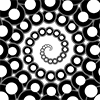
Putting a loop-de-loop along a circle's circumference. Looks much like 'Spirograph' images of yore.
TNTLoopyCircle Features and Usage:
| Primary Attributes: |
7 Parameters:
|
|---|---|
| To Create: |
The example above was created by:
var circle = new TNTDisk(origin, 14, lightGray, null);
circle.drawTNTDisk(context);
var myLoopyCircle = new TNTLoopyCircle(origin, 14, 6, 8, pink, purpleStroke, 0);
myLoopyCircle.drawTNTLoopyCircle(context);
var myLoopyCircle2 = new TNTLoopyCircle(origin, 5, -1.7, 3.1, null, maroonStroke, 0);
myLoopyCircle2.drawTNTLoopyCircle(context);
|
| To Draw: |
myLoopyCircle.drawTNTLoopyCircle(context); |
| Comments: |
The gray circle is there to show how the pink/purple image is related to it! They both have the same base radius! |