
This is our (feeble) attempt to review the big ideas in Java to get us ready for the AP exam. If you want a bit of culture, you may view our musical summary sung to the tune of It's a Small World. We're adding to it regularly so keep refreshing!
Meanwhile, you can examine Oracle's Java Documentation to learn about Java
About the Java Language:
-
It's an Object-Oriented Programming environment (OOP)
-
Everything is based on a 'class' which can be thought of as a 'software factory,''engine, ' or basic organizational unit.
-
It's 'heavily typed': you must specify the nature of data as you refer to it: is it integer? decimal? character?
-
It's compiled, not interpreted. This means that a runtime, the Java compiler looks through the entire program looking for syntactical errors as it processes the source code you wrote (Java) and compiles it into 'bytecode.' If if finds any error at all, nothing will run until that problem is fixed.
(While annoying, it's like finding a roach in your steak dinner before you start eating it!)
-
Commands end with a semicolon (;). In some languages, that is optional but it is a requirement in Java. The only exception is when code is contained in a 'curly-brace block' ({}). Semicolons after the closing curly brace are allowed but not required.
-
Data within Java can be designated as '
private', 'public' or 'protected.' These accessibility modifiers can be annoying at first, when you are just beginning to learn Java, but are part of Java's committment to make its software applications secure, robust and 'bullet-proof'. -
All computer languages use 'mini programs' called 'functions' to help coders write code more efficiently. In Java, these functions are called 'methods' and have two types:
- void functions that do a task, but do not return any output
- return functions that do a task, and return some sort of result to the user of the function. (These are like the sorts of functions you'd encounter in a math class!)
-
There is a lot of mystery as learners begin Java. Some of the syntax is weird it takes a bit of experience to understand some of the details. It's like being transported to a foreign country where you don't know the language: you have money, Google translate and maybe even a periodic guide, but you're just gonna be uncomfortable...at first. Like a wart, Java grows on you! Be patient and don't give up!
Getting Started with Java Programming:
-
Java applications require a file that contains a function that controls the action of the entire app. These files are often designated as 'driver' or 'runner' code, but don't have to have that name.
-
Create a Java file, like:
MyRubberDuckDriver.java -
Within that file, create a class with exactly that same name:
                                                    public class MyRubberDuckDriver{

}//end class -
Within that that class, create 'the main method':
public static void main(String args[]){
}//end main method -
Common 'starting place' for a Java app:
    public class MyRubberDuckDriver{
        public static void main(String args[]){
            System.out.println("=== Welcome to the RubberDuck Saga! ===");
        }//end main method
    }//end class
-
-
In the snippet of code above, notice the use of the
Systemclass to call a member method,printlnfrom itsoutmodule. This is the way Java allows users to print information to the console. Just put your messages in double quotes and send it toprintln, and you'll have your message!Notice also how blocks of code are 'nested' inside others. To assist readability, professional coders follow a strick indentation protocol to make it easier to see important code structures.
-
All programming languages use variables and functions as they do their thing. It's a tradition in CS that functions that are affiliated with classes are called 'methods.' Since everything in Java must be in a class, functions in Java are called 'methods.'
-
By tradition/expectation, class names begin with a capital letter; therefore, nothing other than a class should begin with a capital. The only other exception is that variables marked as
final(they can't be modified after initialization) are listed in all caps -
It is desirable to comment your code to document important aspects of your program for yourself and for others.
//This is a single line commment- This is a block comment:
/*
    Coder: TTG
    Date: 10/03/2022
    File: MyRubberDuckDriver.java
*/
-
'Code Vandalism' is a helpful troubleshooting technique! Use it often. It means that you take some code that works (compiles) and then you deliberately 'break it' to see what the error messages are.
-
Whenever possible, your code should be 'self-documenting' with meaningful variable and method (function) names
-
Nearly everything in Java code is contained in something else (nested). It's helpful to: 'Write the container, Fill the container!' See your teacher for details!
Output/Input to the Java Console:
- Output:
-
The System class has 2 'static' methods to print information to the console:
-
System.out.println("=== Welcome to the RubberDuck Saga! ==="); -
System.out.print("Do you have a RubberDuck (y/n)? ");
Note that each method is 'static' because an object was not created or necessary to call the method from the
Systemclass. Such methods are also called 'class methods'' (as opposed to 'instance methods' (See the information aboutScannerobjects below.)). -
-
Concatenation Example (Using '+' to glue Strings together):
String fn = "Ralph"; System.out.println("My RubberDuck is named: " + fn); -
Escape Sequences: (Special symbols used for printing unique 'stuff' to the console):
-
\n: new line -
\t: tab -
\": double quote -
\r: return
-
- A great trouble shooting technique is to 'echo print' information to the screen as you create it. You can also leave a 'trail of breadcrumbs' showing the unfolding of your logic as it is implemented.
-
The System class has 2 'static' methods to print information to the console:
-
Input:
-
Create a Scanner object (instance), like:
Scanner input = new Scanner(System.in); -
The Scanner 'instance',
input, is an object 'constructed'' by a call to the Scanner 'constructor.' As such, it has methods affiliated with it (like superpowers, but called 'instance' methods). These are called as shown below by using the 'dot operator':-
int x = input.nextInt(); -
long x = input.nextLong(); -
double y = input.nextDouble(); -
float z = input.nextFloat(); -
String str = input.nextLine(); -
char ch = input.nextLine().charAt(0); -
boolean isReady = input.nextBoolean();
Scanner input = new Scanner(System.in); //only 1 Scanner needed per Java file! String prompt = "What is your name? "; System.out.print(prompt); String name = input.nextLine(); -
-
DWR! String input following numeric input? Don't forget to flush the buffer!
Study the examples below:System.out.println("**Example where you correctly clear the buffer**"); System.out.print("Enter your age: "); int age = input.nextInt(); System.out.print("Enter your name: "); // When you run this, it will not actually prompt you // for your name. It will use the end of the previous // input instead of asking you (the line feed is swooped up!) String name = input.nextLine(); System.out.println("Age: " + age); System.out.println("Name: " + name); // Should be blank System.out.println(); System.out.println("**Example where you correctly clear the buffer**"); System.out.print("Enter the day of the month: "); int day = input.nextInt(); // To get around the problem from above, we need to // clear the buffer before prompting with next line. input.nextLine(); // Removes any remaining input - clears the buffer! //String dummy = input.nextLine(); //alternative to line above System.out.print("Enter the month name: "); String month = input.nextLine(); System.out.println("It is day " + day + " of " + month)
-
Java Datatypes:
-
The previous section showed statements where a Scanner object, input, was used to read data from the user to be stored in a particular memory location. By necessity, we have to say in advance the nature of the data being stored. This is called datatype.
-
Common datatypes:
Type Nature Wrapper Usage/Comments int 32 bits
integer (whole number) Integer int x = 7;long 64 bits
integer (whole number) Long long y = 1234567890;float decimals Float float e = 2.718f; //dwr! must have an 'f' suffixdouble decimals Double double pi = 3.14;boolean true/false Boolean boolean codingIsFun = true;String Alphanumeric info String String fName = "Fred";
String lName = new String("Flintstone");char Single symbol Character char ch = 'x';
String fName = "Fred";
char firstLetter = fName.charAt(0);Highlighted items: Included in the AP Subset; (but you really should know the other ones as well!)
-
'Wrapper' classes, as mentioned in the table above, are special classes that have methods (superpowers!) that can do 'special things' with ordinary 'primitive' data. (All the datatypes above are primitive except for '
String' which is a class itself.) Visit the links above to the various Wrapper classes found at Oracle.
Using Objects:
- The Object class is at the top of the food chain for all other classes you create. It's like the parent of all, the 'god' class! All other classes inherit from it, but can be modified to what you want!
-
There are several methods in the 'parent' Object class that are either used as they are, or are overridden by 'children' classes:
toString()equals(Object obj)hashCode()getClass()
-
Objects are manufactured by 'constructors': special methods (functions) that exist within a
class. These 'instances' of a class usually have special attributes (ivars) and/or 'instance methods' they can call that are part of that class ecosystem. These properties and/or instance methods can be accessed using the 'dot operator' under certain conditions.
Strings (and chars):
-
Strings are not character (char) arrays, although they can often appear to be such!
-
Strings are so important they have their own special resource page here at TNT. Check it out!
Boolean Expressions and Selection Logic:
- The primitive 'boolean' is a special Java datatype that can have only two states:
trueandfalse. - It is often used in the context of making decisions with keywords such as
if,else, orwhile. - Unlike some languages, Java does not 'see'
trueas a '1' orfalseas a '0'. - It's useful to name boolean variables with linking verbs like: 'isFinished', or 'shouldShowBorder,' whose names suggest a 'yes' or 'no' response.
- Booleans can simplify conditional statements:
if(shouldShowBorder==true)can be written asif(shouldShowBorder). - Boolean conditional may be strung together with logical and (
&&) and logical or (||) conditional operators. (Technical note: the '&' is called an 'ampersand' and the '|' is a 'pipe' symbol). - DWR!: boolean-like statements in math such as: 1<x≤6 MUST be written like: if(1<x && x≤6) ... they cannot be written as statements like you'd see in math class! You have to make them compound conditionals!
- DeMorgan's Law is a very valuable tool you can use to recraft compound boolean statements. Here's a typical example: Consider a child wanting to ride a roller coaster. They have to be oldEnough and tallEnough:
    boolean oldEnough = age >= AGE_LIMIT;
    boolean tallEnough = height >= HEIGHT_LIMIT;
    boolean canRide = oldEnough && tallEnough;
    boolean cannotRide = !canRide;
    cannotRide = !oldEnough || !tallEnough;
The last statement is the application of DeMorgan's Law to the penultimate statement. See how the 'negation (!)' 'distributed' to each of the pieces and also flipped the && to a ||? (A || would be flipped to a && under other circumstances). - Although switch logic is not on the AP test, it's like having
ifandelseon steroids! - Booleans receive their 'quirky' name from George Boole, a famous mathematician often considered the father of the digital age.
- There is so much more to be said about this important topic! Our friends at W3Schools have done the heavy-lifting to put booleans and selection logic in perspective. Go there and glean from their hard work!
Iteration:
- Iteration is a fancy name for 'doing something repetitively' (looping)
- There are 3 types of loops in Java. The last one is very useful but not on the AP subset:
forloop (fixed iteration)whileloop (pre-condition)do...whileloop (post-condition)
- There is also an enhanced for loop (aka 'for-each' loop) that 'iterates' over a array or collection without having to reference the locations of each element. Danger: 'each' is not a keyword in Java!
- A
forloop has a 'control variable' that determines the repetition. It may be declared either inside or outside of the loop block depending on whether or not you need to know something about it after the loop ends. This is a scope idea. whileanddoloops are used for processes where you don't know how long something will take. They MUST have a way of updating the condition that controls them or you may encounter the dreaded infinite loop.- For quality control, it is helpful to write the container, fill the container as you compose loop structures.
- Recursion is also a process of repetition that does not use keywords associated with loops and is discussed below.
Writing Classes:
-
'Perhaps (Clown Nonsense) Is Constructive (Only Toward) Getting Settler's Underwear'
- P: public
- CN: ClassName (should be meaningful, Title case, Same as file name)
- I: instance variables (ivars) aka, properties, field variables, attributes
- C: constructors - public ClassName; multiple 'parameter signatures' allowed (aka 'overloaded'); a robust constructor should give meaning to the attributes of an instance of a class. By default, Java provides a 'default' constructor 'for free' from the Object class, but the minute you provide any constructor, you've got to provide the default if you want one.
- OT: overridden methods from Object class; typically
toStringandequalsDanger: NEVER use an SOP type command in atoStringsetting; build your message andreturnit. Do it at your own peril - G: 'getter' methods, aka 'accessors'. Necessary to procure private attribute information outside of the class
- S: 'setter' methods, aka 'accessors'. DANGER! Setting one attribute may have side effects on others! Use with caution! For example, in a Circle object, changing the 'radius' property would, by definition, change the 'area' and 'circumference' properties!
- U: 'utility' methods: methods that assist in the management or creation of instances of the class; As as example,
computeArea()might be used in a Circle constructor to give meaning to a Circle'sareaivar.
- When possible, reduce your workload by using pre-established Java classes rather than making your own. For example: a Circle object might require a property describing its center. Why not use a Point2D.Double object to satisfy that requirement?! Remember, you might need to import these packages into your program.
Array:
-
While primitive arrays are Objects, they are not 'birthed' via a class constructor and therefore do not have 'superpowers' (methods) of their own. They do have an important attribute
lengthand a 'Wrapper class' that can operate on them (linked below). -
Arrays are so important they have their own special resource page here at TNT. Check it out!
ArrayList:
-
An ArrayList data structure is like an array on steroids! It's created using a class which means that ArrayList instantiations have access to class methods (think, superpowers) that allow us to do wonderful things!
-
ArrayLists are so important they have their own special resource page here at TNT. Check it out!
2D Array:
-
A two-dimensional array (aka 'matrix') is often the data structure of choice for objects like board games, tables of values, theater seats and mazes.
-
Example: 3 x 4 Matrix:
    2 6 8 7
    1 5 4 0
    9 3 2 8
In the example, '4' is at [1][2]. Rows are listed first, columns are listed second. Notice that zero-based indexing is used in the organization scheme.
-
Declarations ([][] symbols may be placed after datatype or identifier. Always row, column order):
- int[][] table; //currently, a null reference
- double matrix[][] = new double[3][4]; //preinitializes to 0.0
- String[][] strs = new String[2][5]; // each element is null
-
The example above could be created using an initializer list:
int matrix[][] = { {2, 6, 8, 7}, {1, 5, 4, 0}, {9, 3, 2, 8} }; -
Matrix 'physiology:'
int numRows = matrix.length; int numCols = matrix[0].length; //specify a row; get length of 'vector' there -
It is traditional to 'traverse' a matrix using row-column traversal using a 'nested' loop:
int tooDee[][] = new int[3][5]; for(int r = 0; r < tooDee.length; r++){ for(int c = 0; c < tooDee[0].length; c++){ int val = r + c; tooDee[r][c] = val; }//end inner loop }//end outer loop -
It's possible to make a 2D array using ArrayLists:
import java.util.*;

public class TooDeeArrayListDriver{
    public static void main(String[] args){
        String msg = "When you have the power to code special blessings are bestowed";
        System.out.println("Message: ");
        System.out.println(msg);
        ArrayList<ArrayList<Character>> tooDee = new ArrayList<ArrayList<Character>>();
        int n = msg.length();
        System.out.println("n = " + n);
        ArrayList<Character> vector = new ArrayList<Character>();
        for(int ndx = 0; ndx < n; ndx++){
            char symbol = msg.charAt(ndx);
            if(symbol != ' ') vector.add(symbol);
            else{
                tooDee.add(vector);
                vector = new ArrayList<Character>();
            }
        }//end loop
        //dwr! add last word
        tooDee.add(vector);
        System.out.println(tooDee);
        System.out.println();
        print2DArray(tooDee);
    }//end main method

    public static void print2DArray(ArrayList<ArrayList<Character>> aL){
        for(int r = 0; r < aL.size(); r++){
            ArrayList<Character> v = aL.get(r);
            for(int c = 0; c < v.size()-1; c++){
                char ch = v.get(c);
                System.out.print(ch + "_");
            }
            char lastChar = v.get(v.size()-1);
            System.out.println(lastChar);
        }
    }//end print2DArray
}//end class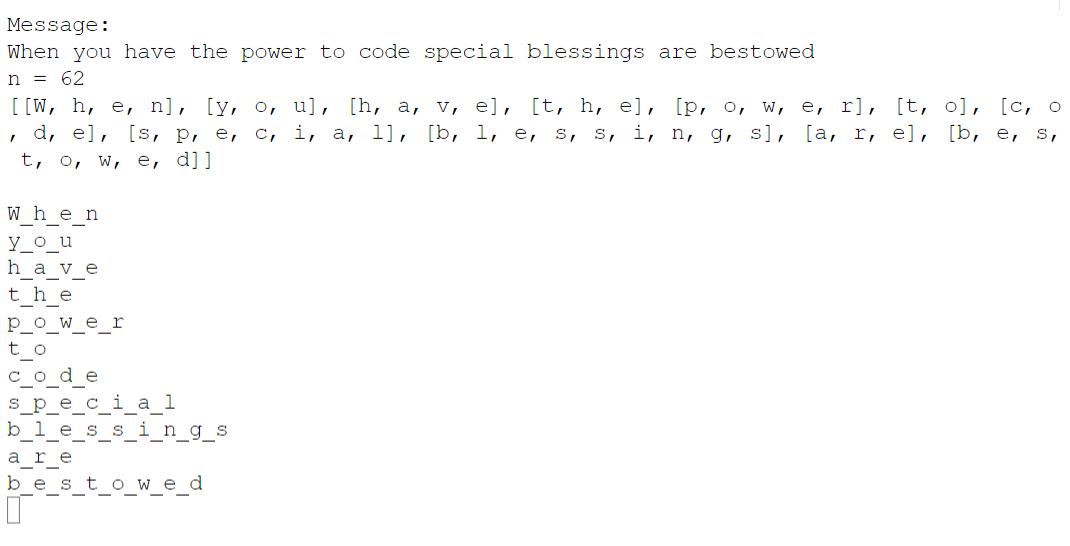
Inheritance:
-
The Object class is at the top of the food chain for all other classes you create. It's like the parent of all, the 'god' class! All other classes inherit from it, but can be modified to what you want!
-
When you create a class like:
public class DooDad{},
in reality you are saying:
public class DooDad extends Object{}
You don't have to have the 'extends' part but it is there by default, reminding us that all classes inherit from the Object class. -
In the AP subset, there are two Object member methods that we typically override:
toString(): this version returns a 'memory address'equals(): this version compares 'memory addresses' of two Objects
-
The
getClass()method can be used to return the class membership of an Object -
The
instanceofoperator can be used to direct logic based on the class membership of an Object
Recursion:
-
Recursion is a repetition process that occurs when a function calls itself.
-
In order to not go infinite, it must have a way of 'putting on its brakes' which usually involves an
if-elseselection structure that provides a 'base case:' a logic branch where the recursive function is not called. -
Recursive methods may be either
voidorreturnin nature. -
The recursive call often involves some sort of 'parameter manipulation' that allows the 'base case' to emerge.
-
return-type recursive methods may also contain other adjustments to the return statement in addition to parameter manipulations. -
There can be multiple recursion calls within a recursive method.
-
There are 2 types of recursion:
- Tail recursion: there are no commands after the recursion call (usually easier to understand)
- Head recursion: additional statements follow the recursion call; in these settings the 'stack' is used to keep track of operations yet-to-be-performed. These are usually harder to trace and understand.
-
Classic recursion examples:
- Propaganda!: a message is repeated via recursion in both a tail and head fashion and contrasted with a classic
forloop - Recursive String Reversal: a message is reversed via tail recursion and contrasted with a classic
forloop - Recursive String Reversal Stack Demo: blow your stack with this JavaScript simulation of the Java stack!
- Recursive Bacteria Growth Demo: An example of 'Head' recursion, where statements follow the recursive call
- Mystery Demo 1: Can you determine the output?
- Palindrome Demo: Analyzes whether a string is a palindrome using recursion
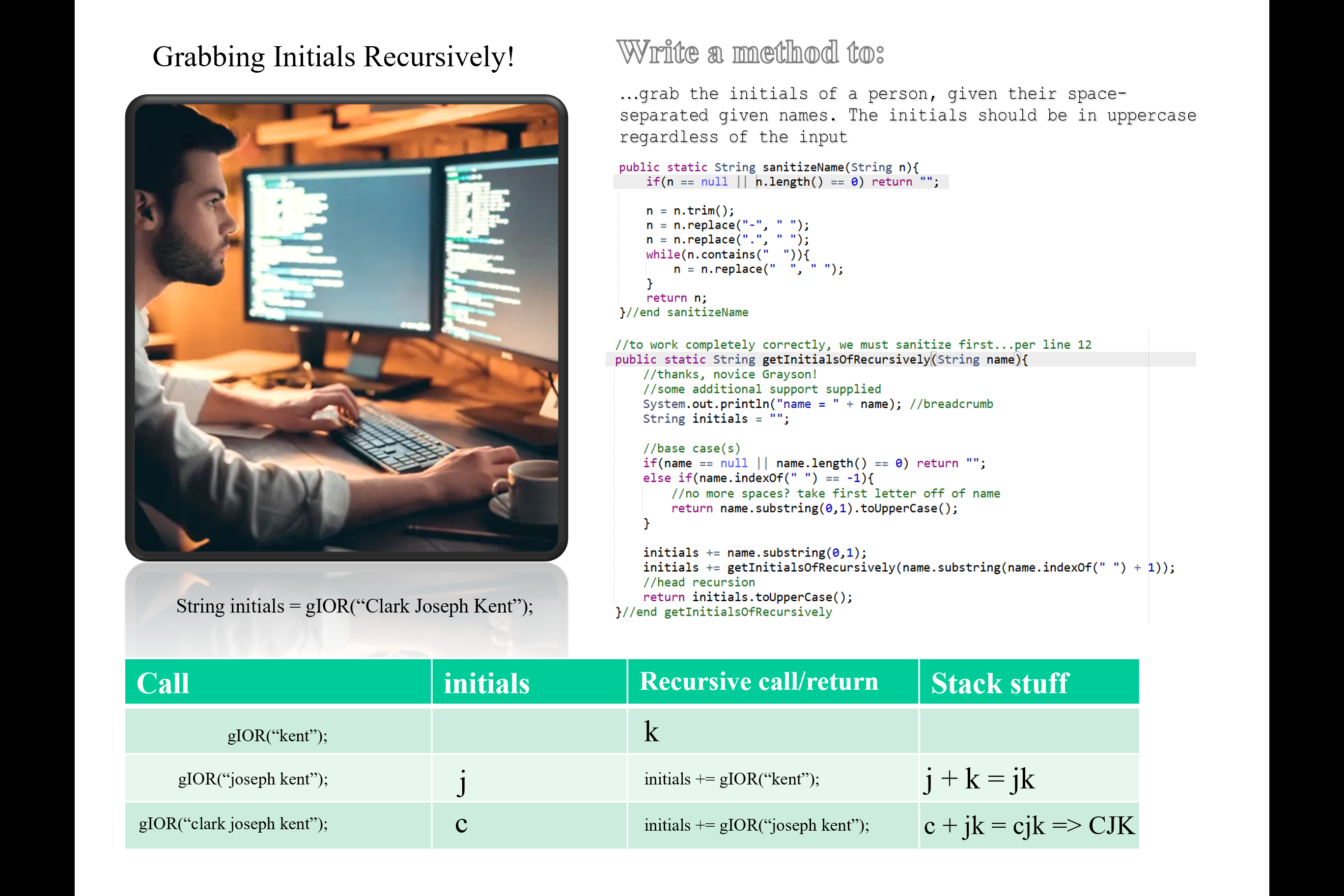
- Grayson's Recursive Initials Collector: Another example of 'Head' recursion, featuring a novel approach for getting the initials of a person's name
-
You can see recursion in action with our Minesweeper JavaScript app. When a player selects a cell with 'zero' neighboring mines, the software recursively looks for other adjacent empty cells.
Here is a peek at the recursion aspect of the program:
See the code:
//recursive method
async function eraseBlob(r, c){
    console.log("r, c = " + r + ", " + c);
    if(isInGrid(r, c)){
        var val = neighborsArr[r][c];
        if(val == 0){
            if(clickArr[r][c] == 0){
                //clickStatsArr[val] = clickStatsArr[val] + 1;
                clickArr[r][c] = 1; //clicked now
                //clickStatsArr[val] = clickStatsArr[val] + 1;
                await sleep(st);
                eraseBlob(r-1, c-1);    //upper left
                await sleep(st);
                eraseBlob(r-1, c);      //top
                await sleep(st);
                eraseBlob(r-1, c+1);    //upper-right
                await sleep(st);
                eraseBlob(r, c+1);      //right
                await sleep(st);
                eraseBlob(r+1, c+1);    //lower-right
                await sleep(st);
                eraseBlob(r+1, c);      //bottom
                await sleep(st);
                eraseBlob(r+1, c-1);    //bottom-left
                await sleep(st);
                eraseBlob(r, c-1);      //left
                await sleep(st);
                clickStatsArr[val] = clickStatsArr[val] + 1;
            }
        }
        console.log("...eraseBlob...val = " + val);
        if(clickArr[r][c] == 0){
            clickArr[r][c] = 1;
            clickStatsArr[val] = clickStatsArr[val] + 1;
        }
    }else{
        console.log(r + ", " + c + "...not in grid");
    }
}//end eraseBlob

function chooseCell(){
    console.log("...chooseCell..." + mouseClickType);
    var val = neighborsArr[theRow-1][theCol-1];
    console.log(val);
    if(val == 0){
        //clickStatsArr[val] = clickStatsArr[val] + 1;
        console.log("...about to erase blob...");
        eraseBlob(theRow-1, theCol-1);
        console.log("...back from blob");
        //clickStatsArr[val] = clickStatsArr[val] + 1;
    }
    if(val == "m"){
        console.log("BOOM!");
        didGameEnd = true;
        showField();
        noLoop();
    }else{
        //if hasn't been clicked, click it; can't re-click
        if(clickArr[theRow-1][theCol-1] == 0){
            clickArr[theRow-1][theCol-1] = 1;
            clickStatsArr[val] = clickStatsArr[val] + 1;
        }

    }
}//end chooseCell
Why do you suppose you can't view the source code when visiting the Minesweeper App?
- Propaganda!: a message is repeated via recursion in both a tail and head fashion and contrasted with a classic
Look at Magic School's List of 30 Important Algorithms and Code Patterns.